
 Extended MAPI in DELPHI
LazyMAPI #8
Mailbox Proxy View
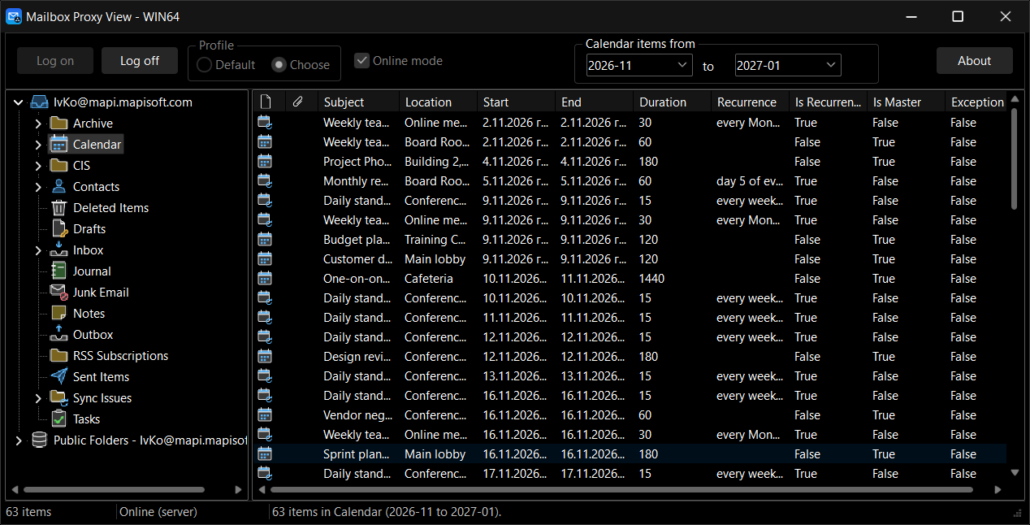
A mailbox viewer in a few lines: the class TMAPIMailboxProxy of the library binds a tree view and a list view to a MAPI session. The tree shows the stores of the profile and their folders, the list shows the items of the selected folder, with the columns that fit the kind of the folder: mail, calendar, contacts, tasks, notes or journal. The form only forwards the events of the two controls to the proxy.
A Calendar folder is shown as a calendar of occurrences for the chosen months: each occurrence of a recurring appointment is a row of its own, with its recurrence pattern, and changed occurrences (exceptions) are marked. A double-click opens the item in its Outlook form; the properties of the store, the folder or the item are a right-click away.
In this example
- A tree and a list bound to a session: TMAPIMailboxProxy.Create(Handle, TreeView, ListView, Session), BuildTree
- The events of the controls go to the proxy: OnTreeNodeExpanding, OnTreeNodeCollapsing, OnTreeNodeChange, OnMsgLVData, OnMsgLVColumnClick, OnMsgLVAdvancedCustomDrawItem
- Columns by folder kind (FolderType): messages, appointments, contacts, tasks, notes, journal entries; a click on a column header sorts; FitColumns
- The calendar of occurrences: CalendarStartDate, MonthsInCalendarView, SetCalendarDateRange; recurring appointments, masters and exceptions
- The open objects: MAPIStore, MAPIFolder, MAPIMsg, MsgTable (a TMAPITable); an item in its Outlook form, modal or not: ShowMessage
- Online mode of a cached Exchange mailbox (the OnLine property of the proxy), and a worker thread with a time limit for a server that does not answer
Works with
Any MAPI profile: an Exchange mailbox (online or cached) with its Public Folders, Exchange Online, PST files, POP3 and IMAP accounts. Outlook must be installed (Win32 or Win64, the same bitness as the program).
Download LazyMAPI #8, compiled and signed (Win32 and Win64)
Download Source code of the example (Delphi 6 – Delphi 13)
Library and shared units: free of charge, on request
How it works
1. The proxy. After the log on, the proxy is created for the tree view, the list view and the session. BuildTree adds the stores of the profile; their folders are read one level at a time, when a node is expanded.
FMailboxProxy := TMAPIMailboxProxy.Create(Handle, MailboxTreeView, MessagesListView, FMAPISession);
FMailboxProxy.OnLine := chkOnline.Checked;  // an Exchange store from the server (MDB_ONLINE)
FMailboxProxy.CalendarStartDate := FStartDate;
FMailboxProxy.MonthsInCalendarView := MonthsBetween(FStartDate, FEndDate);
FMailboxProxy.BuildTree;
2. The events of the controls. Each event handler of the form is one line: the proxy expands the node, opens the folder and sets the columns of the list for its kind, gives the data of a row of the virtual list, and sorts by the clicked column.
procedure TfrmMailboxProxyMain.MailboxTreeViewExpanding(Sender: TObject; Node: TTreeNode; var AllowExpansion: Boolean);
begin
  FMailboxProxy.OnTreeNodeExpanding(Node);
end;

procedure TfrmMailboxProxyMain.MailboxTreeViewChange(Sender: TObject; Node: TTreeNode);
begin
  FMailboxProxy.OnTreeNodeChange(Node); // opens the folder, sets the columns for its kind
  gbCalendar.Visible := Assigned(FMailboxProxy.MsgTable) and (FMailboxProxy.FolderType = oFolderCalendar);
end;

procedure TfrmMailboxProxyMain.MessagesListViewData(Sender: TObject; Item: TListItem);
begin
  FMailboxProxy.OnMsgLVData(Item);
end;

procedure TfrmMailboxProxyMain.MessagesListViewColumnClick(Sender: TObject; Column: TListColumn);
begin
  FMailboxProxy.OnMsgLVColumnClick(Column);
end;
3. The calendar. For a Calendar folder the proxy lists the occurrences between the start month and the end month. Choosing other months reads the calendar again.
FMailboxProxy.SetCalendarDateRange(StartDate,
  MonthsBetween(StartOfTheMonth(StartDate), StartOfTheMonth(EndDate)));
4. The open objects. The proxy keeps the open store, folder and item. “Show Item” opens the selected item in its Outlook form (modal or non-modal); “Show Properties” shows the properties of the object in a property page (TFrmPropPage).
FMailboxProxy.ShowMessage(True);   // the Outlook form, modal
FMailboxProxy.ShowMessage(False);  // non-modal

ShowObjectProperties(FMailboxProxy.MAPIStore, 'store');
ShowObjectProperties(FMailboxProxy.MAPIFolder, 'folder');
ShowObjectProperties(FMailboxProxy.MAPIMsg, 'message');
Requirements
- Delphi 6 to Delphi 13 Florence – Win32, and Win64 with Delphi XE2 and later. Tested with Delphi 10.4 Sydney and Delphi 13 Florence, Exchange Server 2016 and 2019, Exchange Online (an Outlook.com mailbox), Outlook 2016 (32-bit) and Outlook 2019 (64-bit).
- Microsoft Outlook installed (Win32 or Win64, the same bitness as the program) and a MAPI profile
- Units: ExtendedMAPI, MAPIUtils, MAPISessionUtils, MAPIFormViewer (Library), MAPIMailboxProxy and MAPITable (Library\Helpers); the form PropPageFrm (LazyMAPI\Forms)