
 Extended MAPI in DELPHI
LazyMAPI #9
Message Categories
The color categories of Outlook, from Delphi. A category of a message is one string of its “Keywords” property (PidNameKeywords, a named multi-valued string); the colours and the shortcut keys come from the master category list of the mailbox, an XML stream kept in a hidden configuration message of the Calendar folder. The class TMAPIMasterCategoryList of the library reads and writes that list; a few lines of code put a category on a message or take it off.
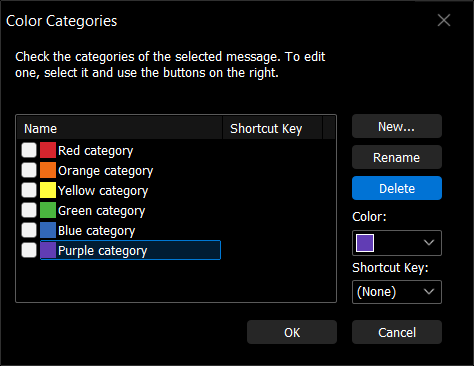
The example lists the messages of a folder. “Categorize” shows the categories of the mailbox with their colours, like the Categorize menu of Outlook: a click puts the category on the selected message, or takes it off when the message has it. “All Categories…” edits the master list: new categories, rename, delete, colour and shortcut key.
In this example
- The master category list of the mailbox: TMAPIMasterCategoryList.Create(Session), CategoryList (names, ColorID), AddCategory, ChangeCategoryName, ChangeCategoryColorID, ChangeCategoryShortCutKeyID, DeleteCategory, Update
- The 25 category colours of Outlook: MAPIMasterCategoryColors
- The categories of a message: the named property “Keywords” (GetNamedPropID with MAPINamedProp[nidKeywords]), GetPropStringMV, SetPropStringMV
- The last category taken off: the property is deleted (DeleteProps), because an empty multi-valued string is not allowed
- A message with its text, attachments and categories; mark read / unread, delete
- Online mode of a cached Exchange mailbox (MDB_ONLINE), and a worker thread with a time limit for a server that does not answer
Works with
An Exchange mailbox (online or cached), Exchange Online and PST files: the stores that keep a master category list. Outlook must be installed (Win32 or Win64, the same bitness as the program). The categories set by the example show in Outlook at once, and those set in Outlook show in the example.
Download LazyMAPI #9, compiled and signed (Win32 and Win64)
Download Source code of the example (Delphi 6 – Delphi 13)
Library and shared units: free of charge, on request
How it works
1. The master category list. TMAPIMasterCategoryList finds the IPM.Configuration.CategoryList message among the associated messages of the Calendar folder of the default store and reads its XML. The “Categorize” menu is built from it: one item per category, with its colour, checked when the selected message has it.
FMasterCategories := TMAPIMasterCategoryList.Create(FSession);

for I := 0 to MasterCategories.CategoryList.Count - 1 do
begin
  Item := TMenuItem.Create(pmColors);
  Item.Caption := MasterCategories.CategoryList.Strings[I];
  Item.ImageIndex := MasterCategories.CategoryList.ColorID[I]; // one of MAPIMasterCategoryColors
  Item.Checked := MessageCategories.IndexOf(MasterCategories.CategoryList.Strings[I]) >= 0;
  Item.OnClick := CategoryItemClick;
  pmColors.Items.Add(Item);
end;
2. The categories of a message. “Keywords” is a named property: its property tag is looked up (or created) in the name map of the message, then the strings are read as a multi-valued property.
function GetMessageCategories(const AMessage: IMessage; AList: TStrings; ACreate: Boolean): Boolean;
var
  PidNameKeywords: DWORD;
begin
  Result := GetNamedPropID(AMessage, MAPINamedProp[nidKeywords].MAPINAMEID, MAPINamedProp[nidKeywords].PROP_TYPE,
    PidNameKeywords, ACreate);
  AList.Clear;
  if Result then
    GetPropStringMV(AMessage, PidNameKeywords, AList);
end;
3. A category on or off. A click on a category of the menu adds it to the list of the message, or removes it when the message has it, and saves the message. When no category is left, the property is deleted: MAPI does not accept a multi-valued string with no values.
GetMessageCategories(Msg, List, True);
Index := List.IndexOf(Name);
if Index >= 0 then
  List.Delete(Index)   // off
else
  List.Add(Name);      // on

if List.Count = 0 then
  hr := Msg.DeleteProps(@Tags, Problems) // no category left: no "Keywords" property
else
  SetPropStringMV(Msg, PidNameKeywords, List);
Msg.SaveChanges(KEEP_OPEN_READWRITE);
4. Editing the master list. “All Categories…” opens the Color Categories dialog (TMAPIMasterCategoryFrm, LazyMAPI\Forms). It changes the list with AddCategory, ChangeCategoryName, ChangeCategoryColorID, ChangeCategoryShortCutKeyID and DeleteCategory; Update writes the XML back to the configuration message, and Outlook uses the new list.
Form := TMAPIMasterCategoryFrm.Create(Self, MasterCategories);
try
  Form.ShowModal;
finally
  Form.Free;
end;
Requirements
- Delphi 6 to Delphi 13 Florence – Win32, and Win64 with Delphi XE2 and later. Tested with Delphi 10.4 Sydney and Delphi 13 Florence, Exchange Server 2016 and 2019, Exchange Online (an Outlook.com mailbox), Outlook 2016 (32-bit) and Outlook 2019 (64-bit).
- Microsoft Outlook installed (Win32 or Win64, the same bitness as the program) and a MAPI profile
- Units: ExtendedMAPI, MAPIUtils, MAPIMacros, MAPIPropUtils, MAPISessionUtils, MAPIFldUtils (Library), MAPICategory (Library\Helpers); the form MAPIMasterCategory and FolderTreeSupport (LazyMAPI\Forms)