
 Extended MAPI in DELPHI
Experimental #7
OLE attachments inside an RTF body
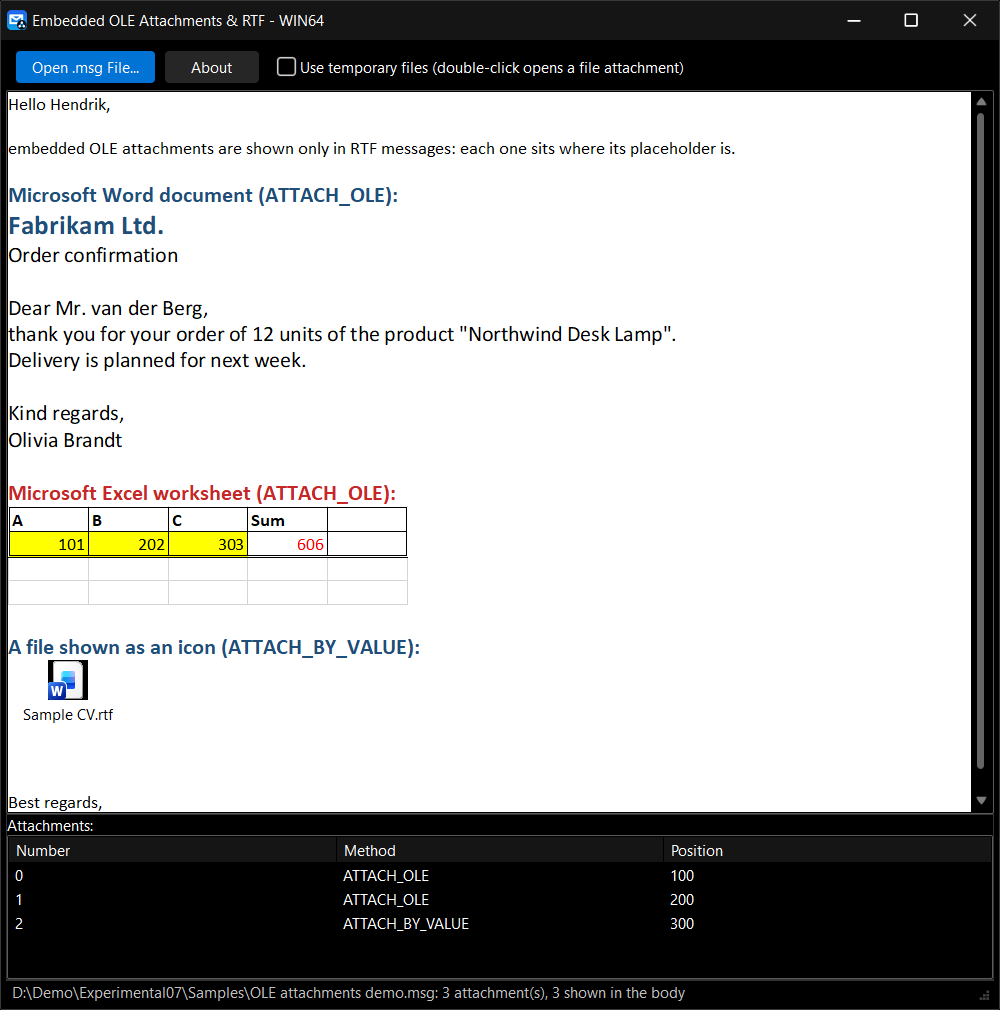
In an RTF message Outlook shows an attachment inside the text, at the place where it was inserted: a Word document or an Excel worksheet as the object itself, a file as its icon. This example does the same in a Delphi TRichEdit. It opens a .msg file, loads its RTF body and puts every attachment at its rendering position: OLE attachments are loaded from their storage and run in their server (Word, Excel) on a double click; file attachments are shown as an icon with the file name.
The rule comes from [MS-OXRTFEX]: the RTF body holds an \objattph placeholder for each attachment that is rendered, and the attachments sorted by PR_RENDERING_POSITION belong to the placeholders in their order.
In this example
- A .msg file opened read-only: StgOpenStorage + OpenIMsgOnIStg
- The RTF body: PR_RTF_COMPRESSED opened as a stream, WrapCompressedRTFStream
- The \objattph placeholders of [MS-OXRTFEX] (an escaped “\\objattph” in the text is not one)
- The attachment table sorted by PR_RENDERING_POSITION (-1 = not in the body)
- An OLE attachment (ATTACH_OLE): PR_ATTACH_DATA_OBJ as IStorage, copied to a writable storage in memory, OleLoad
- A file attachment (ATTACH_BY_VALUE): a static picture of the file icon and name (no file is written), or an embedded package through a temporary file
- The rich edit as an OLE container: EM_GETOLEINTERFACE, IRichEditOle.InsertObject (REOBJECT), SetHostNames
- A double click: IRichEditOle.GetObject finds the attachment, IOleObject.DoVerb opens it
Works with
.msg files with an RTF body. A sample is included in the folder Samples: OLE attachments demo.msg, with a Word document object, an Excel worksheet object and a file shown as an icon. An HTML or plain text message has no placeholders: its attachments are only listed. To open an OLE object, its server (Word, Excel) must be installed.
Download Experimental #7, compiled and signed (Win32 and Win64)
Download Source code of the example (Delphi 6 – Delphi 13)
Library and shared units: In package
How it works
1. Load the RTF body. PR_RTF_COMPRESSED is opened as a stream and decompressed with WrapCompressedRTFStream. Before the RTF goes into the rich edit, each \objattph placeholder is replaced by a text marker that the attachment will replace later.
hr := FMessage.OpenProperty(PR_RTF_COMPRESSED, @IID_IStream, STGM_READ, 0, IUnknown(OleStreamC));
if Succeeded(hr) then
  hr := WrapCompressedRTFStream(OleStreamC, 0, OleStreamU);
// ... read OleStreamU into Rtf

// [MS-OXRTFEX] 2.2.3.4: an attachment is rendered where its \objattph placeholder is
FMarkers := 0;
P := FindPlaceholder(Rtf, 1);
while P > 0 do
begin
  Inc(FMarkers);
  Rtf := Copy(Rtf, 1, P - 1) + '{' + AnsiString(Marker(FMarkers)) + '}' + Copy(Rtf, P + L, MaxInt);
  P := FindPlaceholder(Rtf, P);
end;
RichEdit.PlainText := False;
RichEdit.Lines.LoadFromStream(Stream);
2. The attachments in rendering order. The attachment table is read sorted by PR_RENDERING_POSITION. The rendered attachments (position not -1) are matched with the markers from the last to the first, so that replacing one marker does not move the others.
const
  AttachmentPropTagArray: record
    cValues: ULONG;
    aulPropTag: array [0 .. 2] of ULONG;
  end = (cValues: 3; aulPropTag: (PR_ATTACH_NUM, PR_ATTACH_METHOD, PR_RENDERING_POSITION));
  SortOrderSet: TSSortOrderSet = (cSorts: 1; cCategories: 0; cExpanded: 0;
    aSort: ((ulPropTag: PR_RENDERING_POSITION; ulOrder: TABLE_SORT_ASCEND)));

hr := FMessage.GetAttachmentTable(fMapiUnicode, AttachmentTable);
hr := HrQueryAllRows(AttachmentTable, @AttachmentPropTagArray, nil, @SortOrderSet, 0, RowSet);
...
Found := RichEdit.FindText(Marker(Rendered), 0, Length(RichEdit.Text) + 1, []);
RichEdit.SelStart := Found;
RichEdit.SelLength := Length(Marker(Rendered));
hr := FMessage.OpenAttach(Num, nil, 0, Attachment);
ProcessAttachmentForRTF(RichEdit.Handle, Attachment, cbTempFiles.Checked, Num);
3. An OLE attachment. PR_ATTACH_DATA_OBJ is the storage of the OLE object. The message is open read-only and servers such as Excel do not run on a read-only storage, so the storage is first copied into a writable one in memory; OleLoad then creates the object.
hr := Attachment.OpenProperty(PR_ATTACH_DATA_OBJ, @IID_IStorage, 0, 0, IUnknown(SourceStorage));
if Succeeded(hr) then
  hr := CreateILockBytesOnHGlobal(0, True, LockBytes);
if Succeeded(hr) then
  hr := StgCreateDocfileOnILockBytes(LockBytes, STGM_SHARE_EXCLUSIVE or STGM_CREATE or
    STGM_READWRITE, 0, Storage);
if Succeeded(hr) then
  hr := SourceStorage.CopyTo(0, nil, nil, Storage);
if Succeeded(hr) then
  hr := OleLoad(Storage, IOleObject, OleClientSite, OleObject);
4. A file attachment. Without temporary files the attachment is shown as a static picture: the icon of the file type (SHGetFileInfo from the name alone) and the file name, made with OleMetafilePictFromIconAndLabel and OleCreateStaticFromData. With temporary files it becomes a package object, which a double click opens.
Name := AttachmentFileName(Attachment); // PR_ATTACH_LONG_FILENAME, ...
SHGetFileInfo(PChar(Name), FILE_ATTRIBUTE_NORMAL, Info, SizeOf(Info),
  SHGFI_ICON or SHGFI_USEFILEATTRIBUTES); // the file does not exist
Pict := IMIOleMetafilePictFromIconAndLabel(Info.hIcon, PWideChar(WideString(Name)), nil, 0);
Data := TMetafilePictData.Create(Pict); // an IDataObject with CF_METAFILEPICT
Result := IMIOleCreateStaticFromData(Data, IOleObject, OLERENDER_FORMAT, @Fmt, ClientSite, Storage,
  OleObject); // OleCreateStaticFromData
5. Insert the object into the rich edit. The rich edit is an OLE container: EM_GETOLEINTERFACE gives its IRichEditOle. The object replaces the selected marker; dwUser keeps the attachment number, so a double click can find the attachment again (IRichEditOle.GetObject). REOBJECT needs the natural alignment of richole.h: a packed record is 68 bytes in Win64 instead of 72, and GetObject refuses it.
SendMessage(RichEditHandle, EM_GETOLEINTERFACE, 0, LPARAM(@RichEditOle));
RichEditOle.GetClientSite(OleClientSite);
...
OleSetContainedObject(OleObject, True);
RichEditOle.SetHostNames('OleAttachments', 'Message attachment');
OleObject.SetHostNames('OleAttachments', 'Message attachment');

ZeroMemory(@reobj, SizeOf(reobj));
reobj.cbStruct := SizeOf(reobj);
reobj.clsid := UserClassID;
reobj.cp := REO_CP_SELECTION;
reobj.dvaspect := Aspect;
reobj.dwFlags := REO_DYNAMICSIZE;
reobj.dwUser := AAttachNum; // which attachment (for opening it later)
reobj.oleobj := OleObject;
reobj.olesite := OleClientSite;
reobj.stg := Storage;
hr := RichEditOle.InsertObject(reobj);
Requirements
- Delphi 6 to Delphi 13 Florence – Win32, and Win64 with Delphi XE2 and later. Tested with Delphi 10.4 Sydney and Delphi 13 Florence, Exchange Server 2016 and 2019, Exchange Online (an Outlook.com mailbox), Outlook 2016 (32-bit) and Outlook 2019 (64-bit).
- Microsoft Outlook installed (Win32 or Win64, the same bitness as the program); no MAPI profile and no logon. Word and Excel to open the sample objects.
- Units: ExtendedMAPI, MAPIUtils, MAPIPropUtils, MAPIVariantProp, MAPIMacros (Library); MAPIRichEditOle (in the example)