
 Extended MAPI in DELPHI
Example #10
Read and change your own address book entry
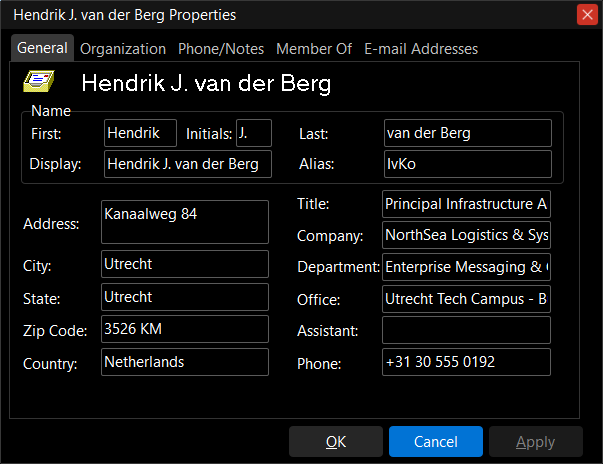
Let users keep their own address book data up to date: the program opens the Global Address List entry of the user of the profile and shows its name, address, organization, phone numbers, the distribution lists it is a member of and its e-mail addresses.
IMAPISession.QueryIdentity returns the entry identifier of the user; the address book is opened with MAPI_ACCESS_MODIFY and the entry with MAPI_MODIFY, and IMAPIProp.GetProps reads the attributes of the Active Directory user. A changed field is written with IMAPIProp.SetProps, an emptied one is deleted with IMAPIProp.DeleteProps, and SaveChanges sends the change to the server.
Reading works with every version of Exchange Server. Writing is historical: it works only up to Exchange 2007, where Outlook writes through a global catalog of Active Directory with the rights of the user. The Address Book service of Exchange 2010 and later (2013, 2016, 2019, Subscription Edition) accepts no change of these attributes ([MS-OXNSPI]: NspiModProps supports only the certificate properties) and MAPI reports MAPI_E_NO_ACCESS, whatever the rights of the user. There a user changes the own data with Outlook on the web, an administrator with Set-User in the Exchange Management Shell, and a program writes to Active Directory directly (LDAP).
In this example
- IMAPISession.QueryIdentity: the entry identifier of the user of the profile
- IMAPISession.OpenAddressBook with MAPI_ACCESS_MODIFY, IAddrBook.OpenEntry with MAPI_MODIFY
- IMAPIProp.GetProps: PR_DISPLAY_NAME, PR_GIVEN_NAME, PR_SURNAME, PR_ACCOUNT, PR_STREET_ADDRESS, PR_LOCALITY, PR_TITLE, PR_COMPANY_NAME, PR_DEPARTMENT_NAME, the phone numbers, PR_COMMENT, PR_EMS_AB_PROXY_ADDRESSES
- The manager (PR_EMS_AB_MANAGER, opened with OpenProperty as an IMailUser), the direct reports and the distribution lists of the user (PR_EMS_AB_REPORTS, PR_EMS_AB_IS_MEMBER_OF_DL)
- IMAPIProp.SetProps and DeleteProps with an SPropProblemArray, then SaveChanges
- MAPI_E_NO_ACCESS explained to the user
Works with
A Microsoft Exchange Server profile: the entry is the Active Directory user of the profile. Reading: every version; writing: Exchange 2000, 2003 and 2007 (on Exchange 2000 to 2007 an administrator may have to delegate the right to write the attributes to the Self principal).
Download Example #10, compiled and signed (Win32 and Win64)
Download Source code of the example (Delphi 6 – Delphi 13)
Library and shared units: In package
How it works
The logon is the same as in Example #1.
1. Open the own entry for writing. QueryIdentity gives the entry identifier of the user; the address book and the entry are opened with the modify flags. An older address book provider that does not know MAPI_NO_CACHE is opened again without it.
hr := FMapiSession.QueryIdentity(cb, EntryID);
try
  hr := FMapiSession.OpenAddressBook(Handle, nil, MAPI_ACCESS_MODIFY, AdrBook);
  hr := AdrBook.OpenEntry(cb, EntryID, nil, MAPI_MODIFY or MAPI_NO_CACHE, ObjType,
    IUnknown(UserProp));
  if (hr = MAPI_E_UNKNOWN_FLAGS) or (hr = MAPI_E_FAILONEPROVIDER) then
    hr := AdrBook.OpenEntry(cb, EntryID, nil, MAPI_MODIFY, ObjType, IUnknown(UserProp));
finally
  MAPIFreeBuffer(EntryID);
end;
2. Read the attributes. One GetProps call with the tags of the fields of the form; an attribute the user does not have comes back as PT_ERROR.
hr := SizedSPropTagArray([PR_DISPLAY_NAME, PR_GIVEN_NAME, PR_INITIALS, PR_SURNAME, PR_ACCOUNT,
  PR_STREET_ADDRESS, PR_LOCALITY, PR_STATE_OR_PROVINCE, PR_POSTAL_CODE, PR_COUNTRY,
  PR_TITLE, PR_COMPANY_NAME, PR_DEPARTMENT_NAME, PR_OFFICE_LOCATION, PR_ASSISTANT,
  PR_BUSINESS_TELEPHONE_NUMBER, PR_CREATION_TIME, PR_LAST_MODIFICATION_TIME,
  PR_EMS_AB_PROXY_ADDRESSES], TagArray);
hr := FMailBox.GetProps(TagArray, fMapiUnicode, ValueCount, Values);
for I := 0 to Integer(ValueCount) - 1 do
  case PSPropValueArray(Values)[I].ulPropTag of
    PR_TITLE:  ebTitle.Text := PSPropValueArray(Values)[I].Value.lpsz;
    PR_LOCALITY: ebCity.Text := PSPropValueArray(Values)[I].Value.lpsz;
    // ... the other fields
  end;
3. Write the changes (Exchange 2007 and older). A changed field is set, an emptied field is deleted: an empty string is not written, because it would change the data instead of removing it. The problem array tells which attributes could not be changed.
MAPIAllocateBuffer(SizeOf(TSPropValue) * SetCount, Pointer(NewValues));
for I := 0 to High(FGeneralPage) do
  if FGeneralPage[I].Changed and (FGeneralPage[I].Value <> '') then
  begin
    PSPropValueArray(NewValues)[N].ulPropTag := FGeneralPage[I].PropID;
    PSPropValueArray(NewValues)[N].Value.lpsz := PChar(FGeneralPage[I].Value);
    Inc(N);
  end;
hr := FMailBox.SetProps(N, NewValues, Problems);

// emptied fields: DeleteProps with their tags
hr := FMailBox.DeleteProps(DeleteTags, Problems);

hr := FMailBox.SaveChanges(KEEP_OPEN_READWRITE);
if hr = MAPI_E_NO_ACCESS then
  ShowErrorText('The server refuses the change (Exchange 2010 and later) ...');
Requirements
- Delphi 6 to Delphi 13 Florence; Win32, and Win64 with Delphi XE2 and later
- A MAPI subsystem: Microsoft Outlook (Win32 or Win64, the same bitness as the program) with a Microsoft Exchange Server profile
- Units: ExtendedMAPI, EDK, MAPIUtils, MAPIMacros (Library)